How DevTools is built: Astro, Svelte and agents with a plan
Svelte islands, one folder per tool, privacy declared in the code and a whole site built by agents running verified plans.
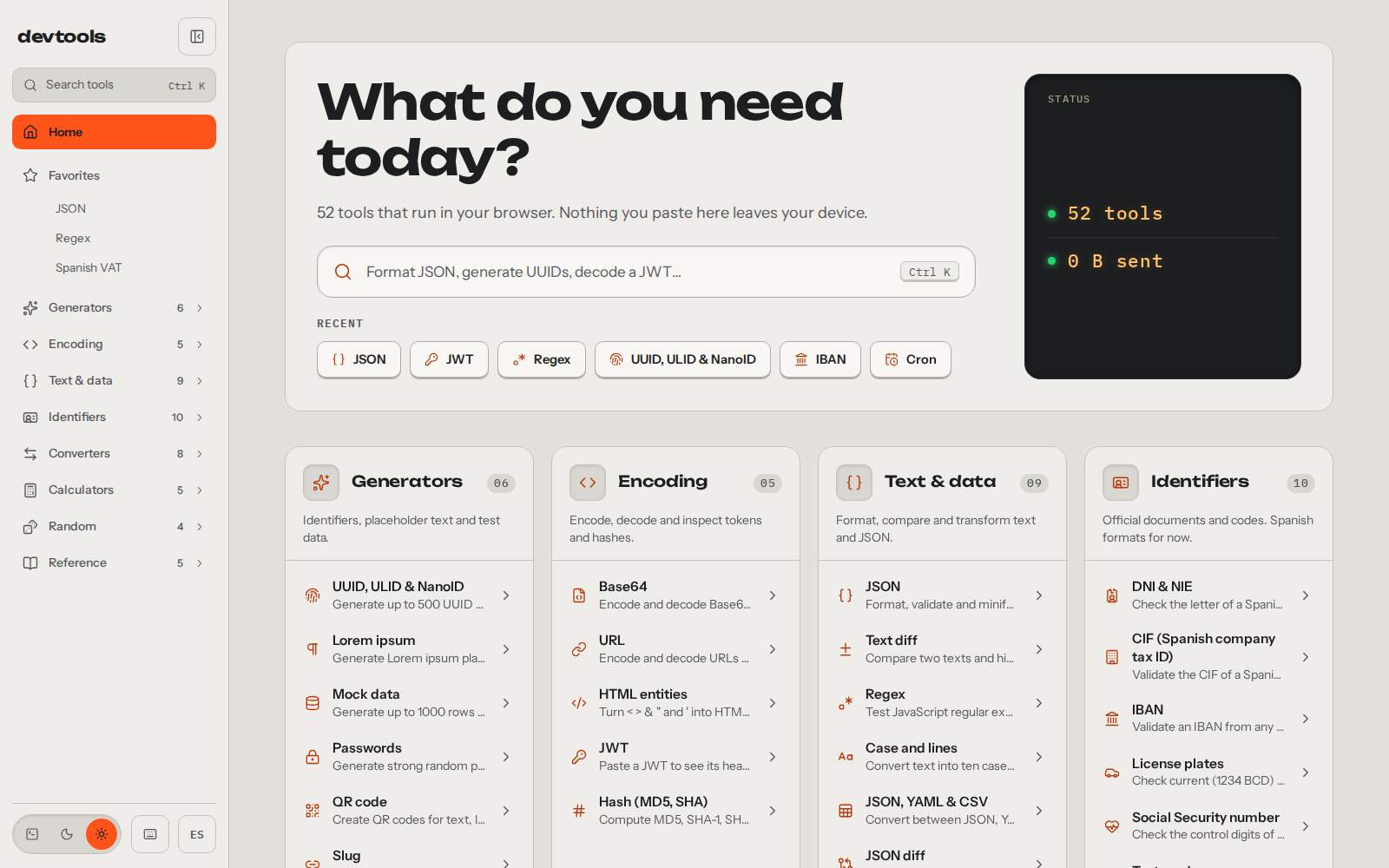
The first version of DevTools went out on 14 February 2026 with 14 tools, and it was just for me. By September I wanted three things: for it to look better and be clearer, to add the tools I saw my coworkers using (mostly for filling in data for Spanish government paperwork) and for it to stop being mine and become anyone’s.
So I rebuilt it from scratch in Astro and Svelte, and the old version stayed parked in legacy/ until the new one had all its tools. The interesting part of the process is how I built it: I was the architect and the builders were coding agents. The whole site was made that way.
Architect and builders: spec, plans and review
My part of the work starts before the code. I write and review the design spec (there are two in docs/superpowers/specs: the platform and the new tools), split it into plans by batch and review every PR by hand before merging. There are five plans: platform A, platform B and three batches of tools. Each one opens with the same instruction for the agent: run it task by task with subagent-driven development (the recommended option; the other is executing-plans), ticking checkboxes. Plan B sets this order: Task 0 alone, tasks 1 to 12 in parallel, merging their branches and Task 13 alone to close.
What makes this work is how the plan is written. In DevTools it comes down to four decisions.
The first is scoped context. Each tool task touches only its own folder, src/tools/<id>/, and lists what it consumes from the shared code. From plan B on, if a task needs something shared that doesn’t exist, the plan tells it to stop and report instead of making it up. That boundary is what allows the parallelism: in plan B, Task 0 runs alone and leaves each tool’s lines pre-seeded and commented out in the registry and in the component that mounts the islands, separated by blank lines:
// State after Task 0, copied from docs/superpowers/plans/2026-09-26-plataforma-b.md // Plan B: each
tool task uncomments its import below and its line in the template. // Keep the blank lines between
them: they let the parallel branches merge without conflicts. // import Base64 from
'../tools/base64/Base64.svelte'; // import Url from '../tools/url/Url.svelte';
After that, the parallel tasks each run in their own worktree and on their own branch, and they only uncomment their lines. Each branch changes different lines of those two files, which is what lets them merge without stepping on each other. Across the three tool batches that came to 37 lote-N/<id> branches merged one by one (10, 14 and 13). In batch 1 the merge was simulated with git merge-file before writing the plan: 11 merges, 0 conflicts, and the result matched the final file.
The second: plans get verified before they’re handed over. In batch 1 all the code was written first in a throwaway clone of main and passed format, lint, check, 487 tests, the build (54 pages) and 69 e2e tests. The plan’s code blocks were copied from those files. The test vectors (DNI, CIF, IBAN, NSS, Luhn cards, EAN and ISBN) were checked against an independent implementation in Node, and the IBAN table against the spec’s: 102 countries, 0 differences.
The third is the global constraints at the top of the plans, with the traps already stepped on: TypeScript ^6 because 7 breaks the peer deps of @astrojs/check and @astrojs/svelte, Astro 7 with a Rust compiler that doesn’t forgive invalid HTML, and build.format: 'file' because Netlify answered with a 301 on the URL without a trailing slash.
The fourth is a rule for the builder when reality doesn’t match the plan: adapt the component to the real kit, not the other way round, and say so in the commit.
With all that, human review is still the gate to merge. What the builders didn’t get right the first time, I caught there: the screen where the result shows up never quite looked right, and at first the home page didn’t have the list of tools.
One folder per tool, Svelte islands for what’s interactive
Astro generates a static page per tool and language from a typed registry, src/tools/registry.ts. The layout, the sidebar and the text are static HTML. The interactive parts are islands: Svelte components that Astro hydrates in the browser inside that static page. DevTools has four kinds of island: each tool’s (one per page), the command palette, the shortcuts dialog and the toaster. Outside them there are framework-free scripts in the layout and in some Astro components: the one that applies the theme before the page paints, the sidebar, favorites and shortcuts.
Each tool is a self-contained folder: a pure logic.ts with its tests, meta.ts with the name, slugs and options, strings.ts with the interface text, content.es.md and content.en.md with the explanation, and its component. In plan B and in batches 1 and 2 the logic added no dependencies: a homemade MD5, SHA with WebCrypto, BigInt, Intl and randomness from crypto.getRandomValues. Batch 3 does bring libraries, six of them: yaml for the JSON, YAML and CSV converter; marked and dompurify for the Markdown preview; qrcode-generator for the QR code; ua-parser-js for the User-Agent, and semver for version ranges. Each one is imported only from its tool’s folder, so Vite keeps it in that page’s chunk and the rest of the site doesn’t download it. In every case, logic.ts doesn’t touch document, window or localStorage, so it’s tested in Node. The DNI letter (the check letter of the Spanish national ID) fits in one line:
// src/lib/ids.ts
export function dniLetter(n: number): string {
  return DNI_LETTERS[n % 23];
}
Privacy, written in the code
The rule that isn’t up for negotiation: whatever the tool, privacy stays untouched. And it’s in the code. Tools that handle sensitive data declare in their meta.ts that they don’t remember what you type: DNI, IBAN, NSS (the Spanish Social Security number), phone numbers, cards, JWT, cURL, passwords and hashes carry rememberInput: false:
// src/tools/dni/meta.ts
export const meta: ToolMeta = {
  id: 'dni',
  category: 'ids',
  slug: { es: 'validador-dni-nie', en: 'spanish-dni-nie-validator' },
  // …
  rememberInput: false,
  // …
};
The URL tool adds one more filter: a URL with a password in it (user:password@) is never saved, even though the tool remembers everything else.
The tools’ storage goes through src/lib/storage.ts, and that module never throws. If the browser blocks localStorage or it’s full, the site keeps working without remembering anything:
export function writeString(key: string, value: string, kind: Area = 'local'): void {
  try {
    area(kind)?.setItem(STORAGE_PREFIX + key, value);
  } catch {
    // Storage blocked or full: the app keeps working without persistence.
  }
}
It never cost me a feature, because I never designed a tool without having privacy in mind from the start. There was nothing to remove at the end.
The only thing that runs outside your browser is a Netlify edge function: code that runs on the CDN before the page is served. It only handles / and answers with a 302 to /es or /en. To decide, it first reads the functional cookie nf_lang, where the site stores the language of the last page you visited; if it isn’t there, it looks at Accept-Language, and if that’s missing too, English. It sees nothing of what you paste into a tool.
// netlify/lib/root-language.ts
export function rootLocale(cookie: string | null, acceptLanguage: string | null): RootLocale {
  return cookieLocale(cookie) ?? headerLocale(acceptLanguage) ?? 'en';
}
Before that function I used Netlify’s language rules in _redirects, and the CDN cached them: it served one visitor’s language to the next. That’s why the response carries Cache-Control: private, no-store. Besides the edge function, two more things leave your browser, which I already covered in the presentation post: the Umami visit counter and the download of the ECB (European Central Bank) exchange rates, which the tool requests from api.frankfurter.dev (a service that publishes them) in a single request with no parameters: neither the amount nor the currencies leave your machine.
What can go wrong comes first
Adding a tool means thinking through everything it can do and, above all, starting with what can go wrong. The repo’s fix commits show it better than any rule:
fix(curl): don’t alter__proto__in the JSON body. And in the CSV and JSON converter,__proto__keys were getting lost.fix(markdown): addpopover,popovertargetandnameto the sanitizer’sFORBID_ATTR.fix(percent):toPrecision(12)rounded wrong from 13 digits on. 1,234,567,890,123 plus 10% gave 1,358,024,679,140 instead of 1,358,024,679,135.3.fix(cron): it saved the detected time zone instead of only the one you picked.- And a string of
fix(...)commits that pluralize warnings, in two languages, tool by tool.
Three themes, and terminal was the hardest
v1 had a single theme, terminal green. v2 has three (light, dark and terminal) and it took me several rounds to get all three right. Terminal was the headache. It uses IBM Plex Mono for everything, headings and body, with no rounded corners and a green glow:
/* src/styles/tokens.css: a single typeface and three greens for the hierarchy */
:root[data-theme='terminal'] {
  /* … */
  --text: #33ff33;
  --text-dim: #1fae1f;
  --accent: #33ff33;
  --on-accent: #0a0a0a;
  --accent-text: #66ff66;
  /* … */
  --font-display: var(--font-mono);
  --font-body: var(--font-mono);
  --radius: 0;
  --radius-lg: 0;
  --radius-pill: 0;
  --glow: 0 0 4px rgb(51 255 51 / 0.45);
  /* … */
}
With a single monospaced font everything read worse than in the other two themes, and the hierarchy didn’t come out on its own. I had to define it by hand with size, weight and those shades of green.
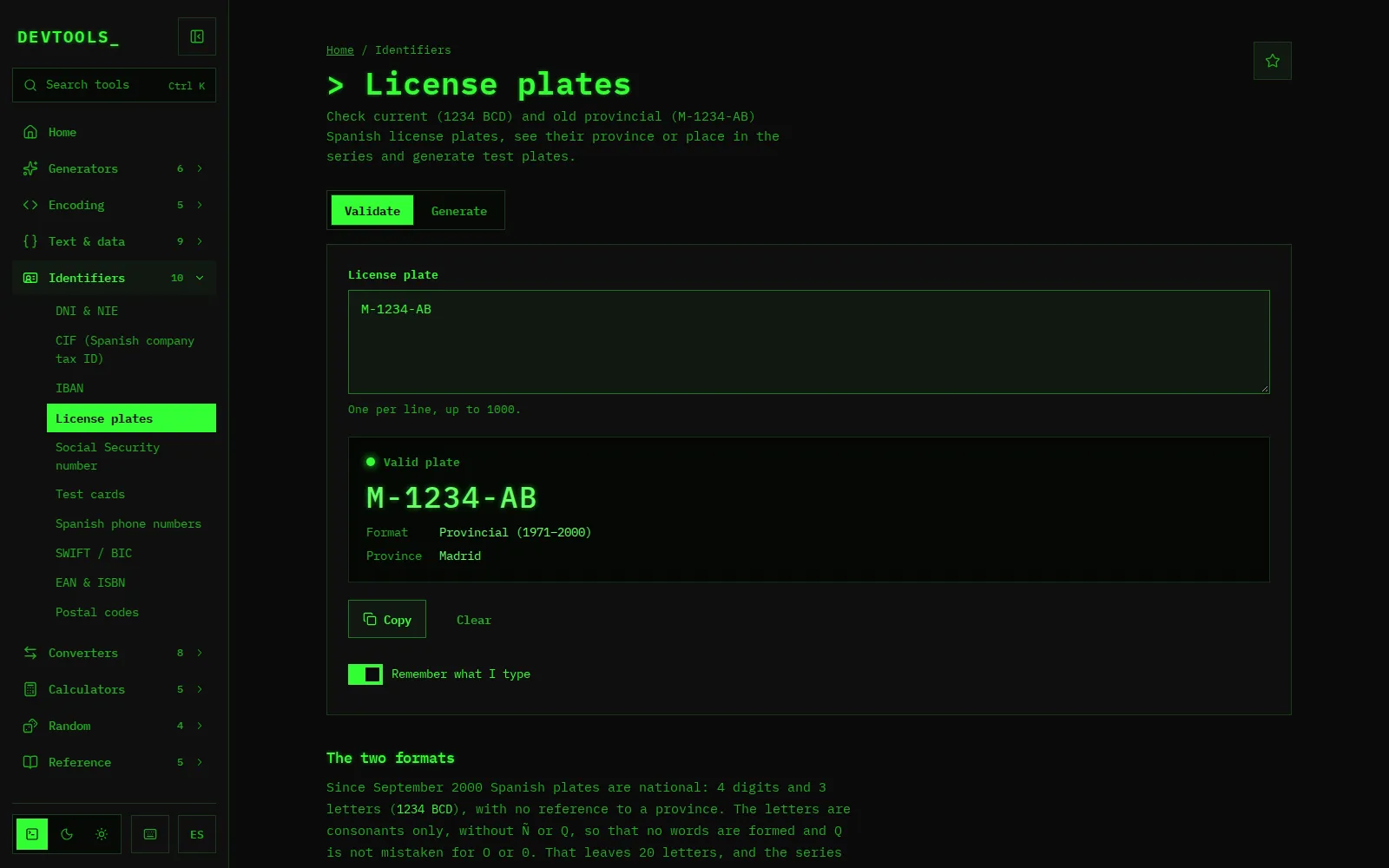
At first terminal was the default theme. Then light took over, because it reads better for a general audience and terminal is very specific to developers. That fits the reason for v2: to stop being a site made for me.
What I learned
- Privacy is a design constraint, not a layer. If every tool is born with the question of what gets stored, you never have to strip anything out later.
- A plan gets verified before you hand it to an agent. Running its code in a throwaway clone and simulating the merge costs less than finding the bug in twelve branches at once.
- The builder adapts to the real kit, not the other way round. If the plan and the code diverge, the code that exists wins.
- What can go wrong comes first.
__proto__, rounding or plurals in two languages don’t show up in the demo; they show up in use.
If you landed here directly, the why behind DevTools is in the presentation post and the project page at /projects/devtools. The site is at devtools.alvarotc.com and the code, under the MIT license, at github.com/alvarotorresc/devtools. If you want to add a tool or you find a bug, open an issue or a PR: that’s where I read it and that’s where I reply, in the open.